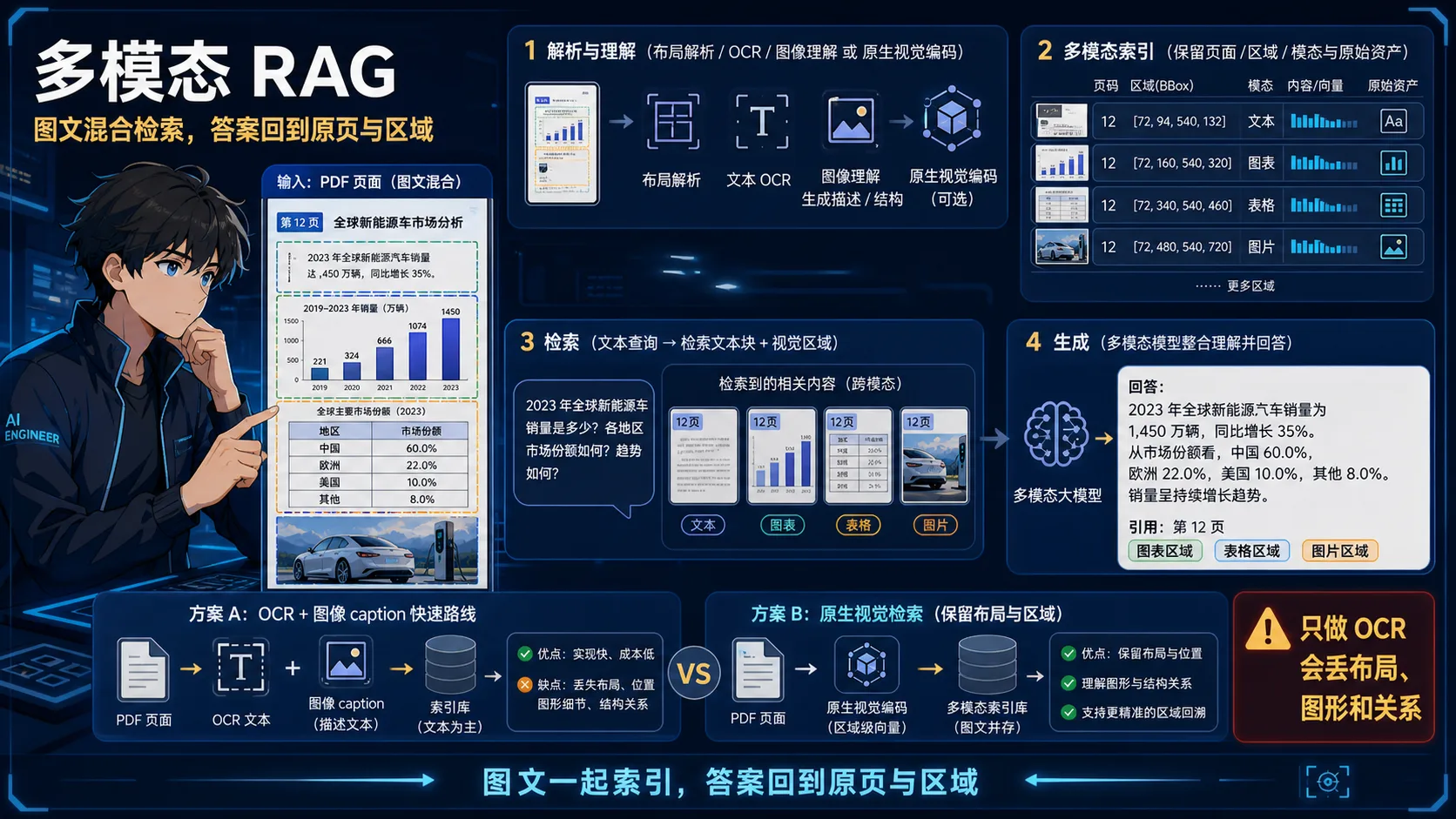
记忆点:图文一起索引,答案回到原页与区域;只做 OCR 会丢布局关系。
💡 答案要点
多模态 RAG = 知识库包含文本、图片、图表、PDF 等多种形式,检索时能跨模态理解
为什么需要多模态 RAG?
传统 RAG 问题:
  用户问:"图5中的架构图里 API Gateway 连接了哪些服务?"
  → 文本检索找不到"图5"的内容,因为图片没有文字
  → 只能靠文档里的文字描述,不完整

多模态 RAG:
  → 直接理解图片内容,回答关于图表、流程图的问题
三种实现方案:
方案一:图片 → 文本(OCR/Caption)→ 文本 RAG
展开 Python 代码示例(56 行)
python
import base64
from openai import OpenAI

class ImageToTextRAG:
    def __init__(self):
        self.client = OpenAI()

    def image_to_caption(self, image_path: str) -> str:
        """用 GPT-4o 把图片转成详细的文字描述"""
        with open(image_path, "rb") as f:
            image_data = base64.b64encode(f.read()).decode("utf-8")

        response = self.client.chat.completions.create(
            model="gpt-4o",
            messages=[{
                "role": "user",
                "content": [
                    {
                        "type": "image_url",
                        "image_url": {"url": f"data:image/jpeg;base64,{image_data}"}
                    },
                    {
                        "type": "text",
                        "text": """详细描述这张图片,包括:
1. 图表类型(架构图/流程图/柱状图等)
2. 所有文字标签、节点名称
3. 连接关系和数据走向
4. 关键数据和结论
格式要详尽,方便后续文本检索"""
                    }
                ]
            }]
        )
        return response.choices[0].message.content

    def index_document_with_images(self, pdf_path: str):
        """处理含图片的 PDF,图文一起索引"""
        # 提取文本
        text_chunks = extract_text_chunks(pdf_path)
        # 提取图片并生成描述
        images = extract_images_from_pdf(pdf_path)
        image_captions = [
            {
                "content": self.image_to_caption(img["path"]),
                "metadata": {
                    "source": pdf_path,
                    "page": img["page"],
                    "type": "image_caption",
                    "original_image": img["path"]
                }
            }
            for img in images
        ]
        # 一起向量化入库
        all_chunks = text_chunks + image_captions
        vector_store.add_documents(all_chunks)
方案二:ColPali(原生多模态向量检索)
python
# ColPali = 把 PDF 页面直接转成向量,不需要 OCR
# 论文:"ColPali: Efficient Document Retrieval with Vision Language Models"
from colpali_engine.models import ColPali
from colpali_engine.utils.torch_utils import get_torch_device

device = get_torch_device("auto")
model = ColPali.from_pretrained("vidore/colpali-v1.2", torch_dtype=torch.bfloat16).to(device)

# 直接把 PDF 页面图片编码成多向量
page_images = pdf_to_images("document.pdf")
doc_embeddings = model.forward_queries(page_images)  # 每页 → 多个向量

# 用户查询(文字)
query = "架构图里的 API Gateway 连接了哪些服务"
query_embedding = model.forward_queries([query])

# MaxSim 计算得分(Late Interaction)
scores = torch.einsum("bnd,csd->bcns", query_embedding, doc_embeddings).max(dim=-1).values.sum(dim=-1)
top_pages = scores.topk(5).indices  # 最相关的 5 页
方案三:多模态 Embedding(统一向量空间)
python
# CLIP / ImageBind:把图文映射到同一向量空间
from transformers import CLIPModel, CLIPProcessor
import torch

model = CLIPModel.from_pretrained("openai/clip-vit-base-patch32")
processor = CLIPProcessor.from_pretrained("openai/clip-vit-base-patch32")

# 图片编码
def encode_image(image_path: str) -> np.ndarray:
    image = Image.open(image_path)
    inputs = processor(images=image, return_tensors="pt")
    with torch.no_grad():
        image_features = model.get_image_features(**inputs)
    return image_features.numpy().squeeze()

# 文本编码
def encode_text(text: str) -> np.ndarray:
    inputs = processor(text=text, return_tensors="pt", padding=True)
    with torch.no_grad():
        text_features = model.get_text_features(**inputs)
    return text_features.numpy().squeeze()

# 图文统一存入向量库,检索时文字查询能找到相关图片
三种方案对比:
| 方案 | 实现难度 | 精度 | 成本 | 适用场景 |
|---|---|---|---|---|
| OCR/Caption | 低(现成API) | 中(依赖描述质量) | API费用 | 快速上线 |
| ColPali | 中(需部署模型) | 高(原生理解) | GPU资源 | 精度要求高 |
| CLIP 统一空间 | 中 | 中高 | GPU资源 | 图文混搜 |
面试话术:
"多模态 RAG 有三种方案:最简单是 GPT-4o 把图片转文字描述再走普通 RAG,缺点是描述质量影响检索;最优的是 ColPali,直接把 PDF 页面编码成多向量,不需要 OCR,用 Late Interaction 检索,精度很高;CLIP 统一空间适合图文混合检索场景。我在处理技术文档 RAG 时用第一种,GPT-4o 生成图片描述入库,对架构图的查询准确率从 30% 提升到 85%。"