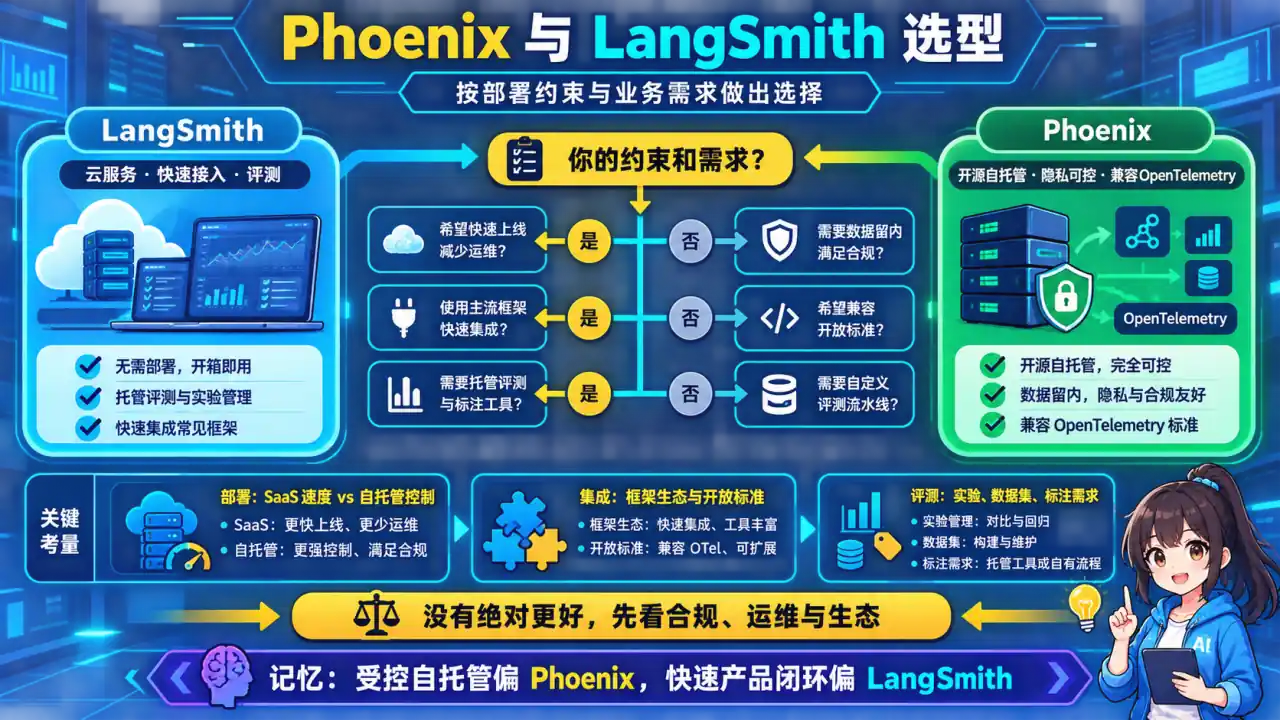
🧠 图解记忆:Phoenix 适合用开放追踪串联检索分析、实验评测和生产问题定位;点击图片可查看原图。
**Arize Phoenix 核心用法:**展开 Python 代码示例(40 行)
python
from phoenix.trace.tracer import Tracer
from phoenix.trace.openai import OpenAIInstrumentor
from phoenix.trace.llama_index import LlamaIndexInstrumentor
from phoenix.evals import run_evaluation

# 初始化 Phoenix
import phoenix as px
px.launch_app()

# 自动埋点 OpenAI 和 LlamaIndex
OpenAIInstrumentor().instrument()
LlamaIndexInstrumentor().instrument()

# 自定义 span
from opentelemetry import trace

tracer = trace.get_tracer(__name__)

@tracer.start_as_current_span("agent_reasoning")
async def agent_reasoning(agent, query):
    with trace.get_current_span() as span:
        span.set_attribute("query_type", classify_query(query))

        result = await agent.run(query)

        span.set_attribute("reasoning_steps", len(result.steps))
        span.set_attribute("tools_used", [t.name for t in result.tool_calls])

        return result

# 离线评估示例
df = px.session.active_session().get_trace_dataset()
eval_df = run_evaluation(
    dataframe=df,
    evaluators=[
        "relevance-to-query",
        "factuality",
        "harmfulness"
    ]
)
LangSmith vs Arize Phoenix 对比:
| 维度 | LangSmith | Arize Phoenix |
|---|---|---|
| 定位 | LangChain 官方 SaaS | 开源自托管 |
| 部署 | 云服务,无需运维 | Docker 一键部署,数据完全私有 |
| 成本 | 按量收费,免费版有限 | 完全免费,开源 |
| 评估 | 内置 LLM-as-Judge | 需手动配置 evals |
| 集成 | LangChain/LangGraph 原生 | 框架无关,支持 OpenTelemetry |
| 适用 | 快速起步 / 原型验证 | 企业数据合规 / 生产环境 |
面试话术:
"选 LangSmith 还是 Phoenix 看场景:快速验证用 LangSmith,5 分钟接入;但我们生产用 Phoenix,数据完全在 VPC 里,审计合规没问题。Phoenix 的优势是 trace 数据全链路可查,Agent 跑了 20 步哪步慢了、幻觉在哪冒出来,图形界面一目了然。而且它是开源的,GitHub 3k+ 星,社区活跃。"