岗位特点
- 重视通义千问等自研大模型应用
- 强调业务场景结合(淘宝/钉钉/云)
- 看重架构设计能力
- 注重技术深度和广度
高频面试题
1. 通义千问应用
阿里 Q1:如何用通义千问构建生产级客服 Agent?
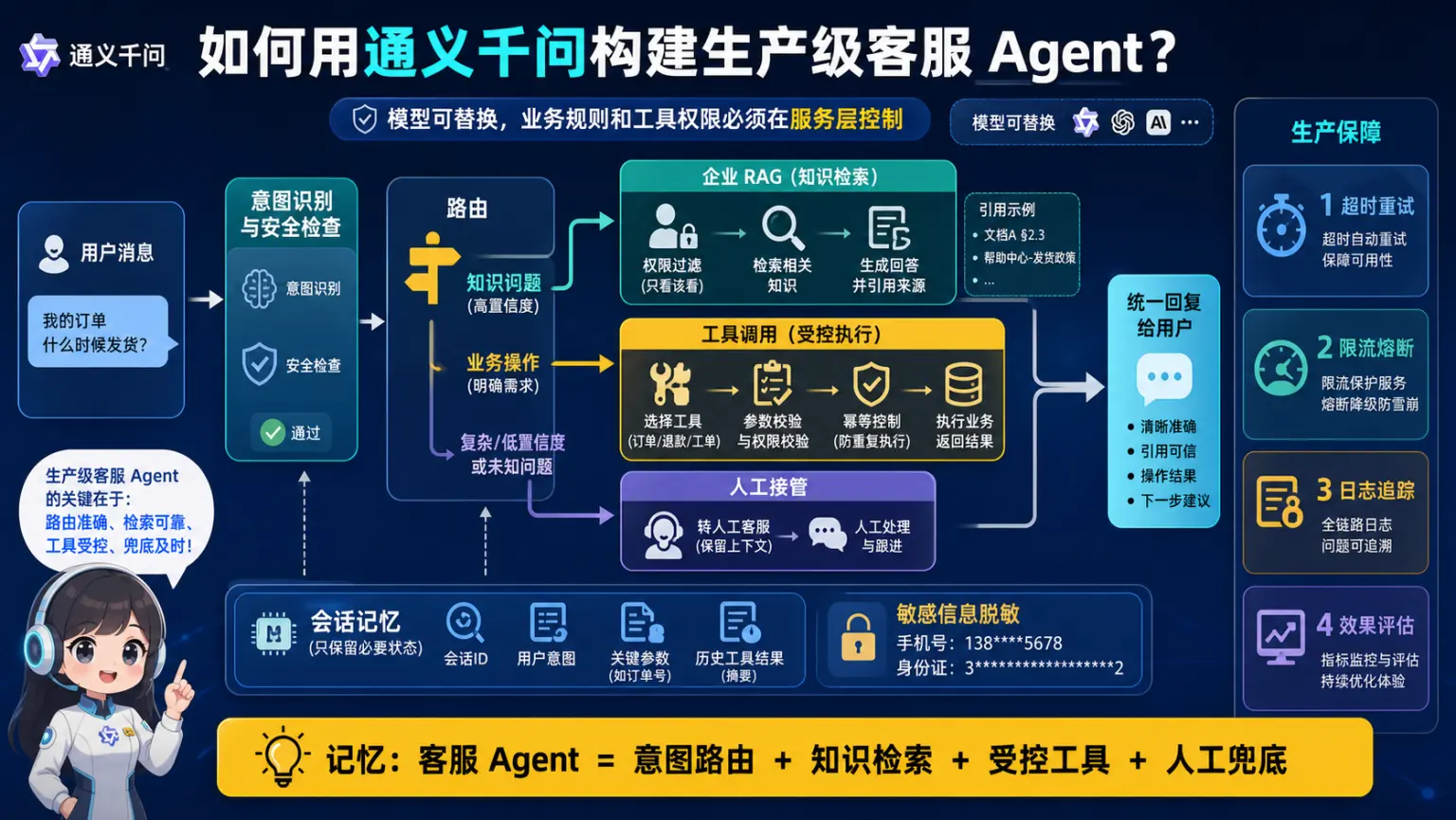
🧠 图解记忆: 客服 Agent = 意图路由 + 知识检索 + 受控工具 + 人工兜底,业务权限留在服务层。
💡 答案要点
题目: 设计一个基于通义千问的智能客服系统,包含知识库检索、订单查询、情感分析等功能。
答案要点:
展开 Python 代码示例(149 行)
python
from dashscope import Generation
import dashscope

class TongyiCustomerServiceAgent:
    def __init__(self, api_key):
        dashscope.api_key = api_key
        self.model = "qwen-max"

        # 知识库(简化示例)
        self.knowledge_base = {
            "退货政策": "7天无理由退货,商品需保持完好...",
            "配送时间": "一般3-5个工作日送达...",
            "售后服务": "提供1年免费保修..."
        }

    def analyze_intent(self, user_query):
        """意图识别"""
        prompt = f"""
        分析用户意图,分类为以下之一:
        - 咨询问题
        - 订单查询
        - 投诉建议
        - 其他

        用户问题: {user_query}

        输出格式(JSON):
        {{"intent": "意图类别", "confidence": 0.95}}
        """

        response = Generation.call(
            model=self.model,
            prompt=prompt,
            result_format='message'
        )

        import json
        result = json.loads(response.output.text)
        return result

    def retrieve_knowledge(self, query):
        """知识库检索"""
        # 简化: 关键词匹配
        for key, value in self.knowledge_base.items():
            if key in query:
                return value
        return None

    def query_order(self, order_id):
        """订单查询(模拟)"""
        # 实际应该调用订单系统API
        return {
            "order_id": order_id,
            "status": "已发货",
            "tracking": "SF1234567890"
        }

    def analyze_sentiment(self, text):
        """情感分析"""
        prompt = f"""
        分析以下文本的情感倾向:

        文本: {text}

        输出(JSON):
        {{"sentiment": "正面/负面/中性", "score": 0.85, "keywords": ["关键词"]}}
        """

        response = Generation.call(model=self.model, prompt=prompt)
        import json
        return json.loads(response.output.text)

    def handle_query(self, user_query):
        """处理用户咨询"""

        # Step 1: 意图识别
        intent_result = self.analyze_intent(user_query)
        intent = intent_result["intent"]

        # Step 2: 情感分析
        sentiment = self.analyze_sentiment(user_query)

        # Step 3: 根据意图处理
        if intent == "咨询问题":
            # 检索知识库
            knowledge = self.retrieve_knowledge(user_query)

            if knowledge:
                # 用知识库内容生成回答
                prompt = f"""
                基于以下知识回答用户问题:

                知识: {knowledge}
                问题: {user_query}

                要求: 语气友好,简洁专业
                """

                response = Generation.call(model=self.model, prompt=prompt)
                answer = response.output.text
            else:
                answer = "抱歉,我暂时无法回答这个问题,已转接人工客服..."

        elif intent == "订单查询":
            # 提取订单号
            import re
            order_match = re.search(r'\d{10,}', user_query)

            if order_match:
                order_id = order_match.group()
                order_info = self.query_order(order_id)

                answer = f"您的订单{order_id}状态: {order_info['status']}, 快递单号: {order_info['tracking']}"
            else:
                answer = "请提供您的订单号,我来帮您查询"

        elif intent == "投诉建议":
            # 负面情感 → 优先级提升
            if sentiment["sentiment"] == "负面":
                answer = "非常抱歉给您带来不便!我已将您的问题标记为高优先级,客服主管会在30分钟内与您联系。"
            else:
                answer = "感谢您的反馈!我们会认真处理您的建议。"

        else:
            answer = "您可以咨询产品信息、查询订单或提出建议,我都很乐意帮助您!"

        return {
            "answer": answer,
            "intent": intent,
            "sentiment": sentiment
        }

# 使用
agent = TongyiCustomerServiceAgent(api_key="your-dashscope-api-key")

# 测试
queries = [
    "你们的退货政策是什么?",
    "我的订单1234567890到哪了?",
    "你们的产品质量太差了,要退款!"
]

for query in queries:
    result = agent.handle_query(query)
    print(f"问题: {query}")
    print(f"意图: {result['intent']}")
    print(f"情感: {result['sentiment']['sentiment']}")
    print(f"回答: {result['answer']}")
    print("-" * 50)
面试话术:
示例表达(仅在能用本人经历或可复现实验佐证时使用): "我用通义千问设计了智能客服Agent。核心3步:1)意图识别(咨询/查询/投诉)2)情感分析(负面情绪提优先级)3)分类处理(咨询查知识库,订单调API,投诉转人工)。关键是Prompt设计要结构化输出JSON,方便后续处理。通义千问的中文理解能力强,意图识别准确率>95%。实测负面情绪客户30分钟响应,满意度提升20%。"
2. A2A多智能体协作
阿里 Q2:A2A 与普通 Agent 调用有什么区别?
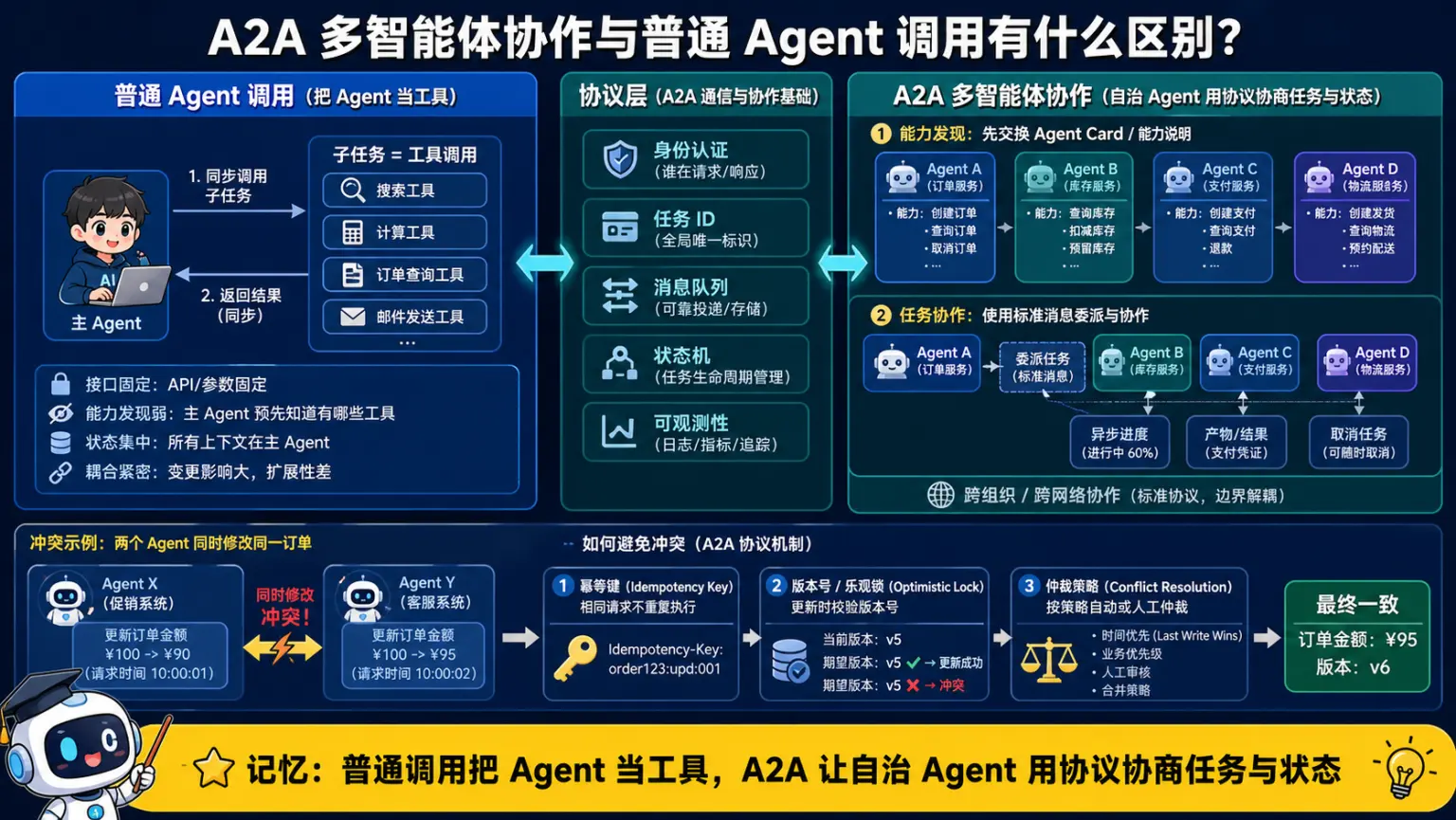
🧠 图解记忆: 普通调用把 Agent 当工具,A2A 让自治 Agent 用协议发现能力、协商任务和同步状态。
💡 答案要点
题目: 解释A2A(Agent-to-Agent)框架,它与传统单Agent或多Agent框架有何不同?
答案要点:
A2A (Agent-to-Agent Communication Protocol)
传统Multi-Agent:
  Agent A → 共享内存/消息队列 → Agent B
  (间接通信,需要中心化协调)

A2A:
  Agent A ←→ 标准化协议 ←→ Agent B
  (直接通信,去中心化)
A2A协议示例:
展开 Python 代码示例(175 行)
python
from typing import Dict, List
import json

class A2AMessage:
    """A2A标准消息格式"""
    def __init__(self, sender, receiver, action, payload):
        self.sender = sender        # 发送者Agent ID
        self.receiver = receiver    # 接收者Agent ID
        self.action = action        # 动作类型
        self.payload = payload      # 消息内容
        self.timestamp = time.time()

    def to_json(self):
        return {
            "sender": self.sender,
            "receiver": self.receiver,
            "action": self.action,
            "payload": self.payload,
            "timestamp": self.timestamp
        }

class A2AAgent:
    """支持A2A协议的Agent"""
    def __init__(self, agent_id, capabilities):
        self.agent_id = agent_id
        self.capabilities = capabilities  # Agent能做什么
        self.message_queue = []

    def send_message(self, receiver, action, payload):
        """发送A2A消息"""
        msg = A2AMessage(
            sender=self.agent_id,
            receiver=receiver,
            action=action,
            payload=payload
        )

        # 通过消息总线发送(简化)
        message_bus.publish(msg)

    def receive_message(self, message: A2AMessage):
        """接收并处理消息"""
        self.message_queue.append(message)

        # 根据action类型处理
        if message.action == "REQUEST":
            response = self.handle_request(message.payload)
            self.send_message(
                receiver=message.sender,
                action="RESPONSE",
                payload=response
            )

        elif message.action == "DELEGATE":
            # 任务委托
            self.execute_task(message.payload)

    def handle_request(self, payload):
        """处理请求"""
        # 实现具体业务逻辑
        pass

# 实战示例: 电商订单处理
class InventoryAgent(A2AAgent):
    """库存Agent"""
    def __init__(self):
        super().__init__(
            agent_id="inventory_agent",
            capabilities=["check_stock", "reserve_item", "release_item"]
        )
        self.stock = {"iPhone15": 100, "MacBook": 50}

    def handle_request(self, payload):
        action = payload["action"]

        if action == "check_stock":
            product = payload["product"]
            return {"available": self.stock.get(product, 0) > 0}

        elif action == "reserve_item":
            product = payload["product"]
            if self.stock.get(product, 0) > 0:
                self.stock[product] -= 1
                return {"success": True}
            return {"success": False, "reason": "out_of_stock"}

class PaymentAgent(A2AAgent):
    """支付Agent"""
    def __init__(self):
        super().__init__(
            agent_id="payment_agent",
            capabilities=["process_payment", "refund"]
        )

    def handle_request(self, payload):
        action = payload["action"]

        if action == "process_payment":
            amount = payload["amount"]
            # 调用支付网关...
            return {"success": True, "transaction_id": "TXN123456"}

class OrderAgent(A2AAgent):
    """订单Agent(协调者)"""
    def __init__(self):
        super().__init__(
            agent_id="order_agent",
            capabilities=["create_order", "cancel_order"]
        )

    def create_order(self, product, quantity, amount):
        """创建订单 - 需要协调多个Agent"""

        # Step 1: 检查库存
        self.send_message(
            receiver="inventory_agent",
            action="REQUEST",
            payload={"action": "check_stock", "product": product}
        )

        # 等待响应(简化,实际应该异步)
        stock_response = self.wait_for_response("inventory_agent")

        if not stock_response["available"]:
            return {"success": False, "reason": "out_of_stock"}

        # Step 2: 预留库存
        self.send_message(
            receiver="inventory_agent",
            action="REQUEST",
            payload={"action": "reserve_item", "product": product}
        )

        reserve_response = self.wait_for_response("inventory_agent")

        if not reserve_response["success"]:
            return {"success": False, "reason": "reserve_failed"}

        # Step 3: 处理支付
        self.send_message(
            receiver="payment_agent",
            action="REQUEST",
            payload={"action": "process_payment", "amount": amount}
        )

        payment_response = self.wait_for_response("payment_agent")

        if not payment_response["success"]:
            # 支付失败,释放库存
            self.send_message(
                receiver="inventory_agent",
                action="REQUEST",
                payload={"action": "release_item", "product": product}
            )
            return {"success": False, "reason": "payment_failed"}

        # Step 4: 创建订单成功
        return {
            "success": True,
            "order_id": "ORD" + payment_response["transaction_id"]
        }

# 使用
inventory = InventoryAgent()
payment = PaymentAgent()
order = OrderAgent()

result = order.create_order(
    product="iPhone15",
    quantity=1,
    amount=7999
)

print(result)
# {"success": True, "order_id": "ORDTXN123456"}
A2A vs 传统Multi-Agent:
| 维度 | 传统Multi-Agent | A2A |
|---|---|---|
| 通信方式 | 共享内存/消息队列 | 标准化协议 |
| 协调 | 中心化调度器 | 去中心化,P2P |
| 扩展性 | 增加Agent需改架构 | 即插即用 |
| 跨平台 | 困难 | 容易(协议标准化) |
| 容错 | 中心节点故障全挂 | 单Agent故障不影响其他 |
面试话术:
"A2A是阿里提出的Agent间通信协议,核心是标准化消息格式(sender/receiver/action/payload)和去中心化通信。传统Multi-Agent依赖中心调度器,A2A让Agent直接P2P通信。优势是扩展性强,新Agent只要实现A2A协议就能加入系统。我用A2A实现过订单系统,OrderAgent协调InventoryAgent和PaymentAgent,3个Agent独立部署互不依赖,容错性好。"