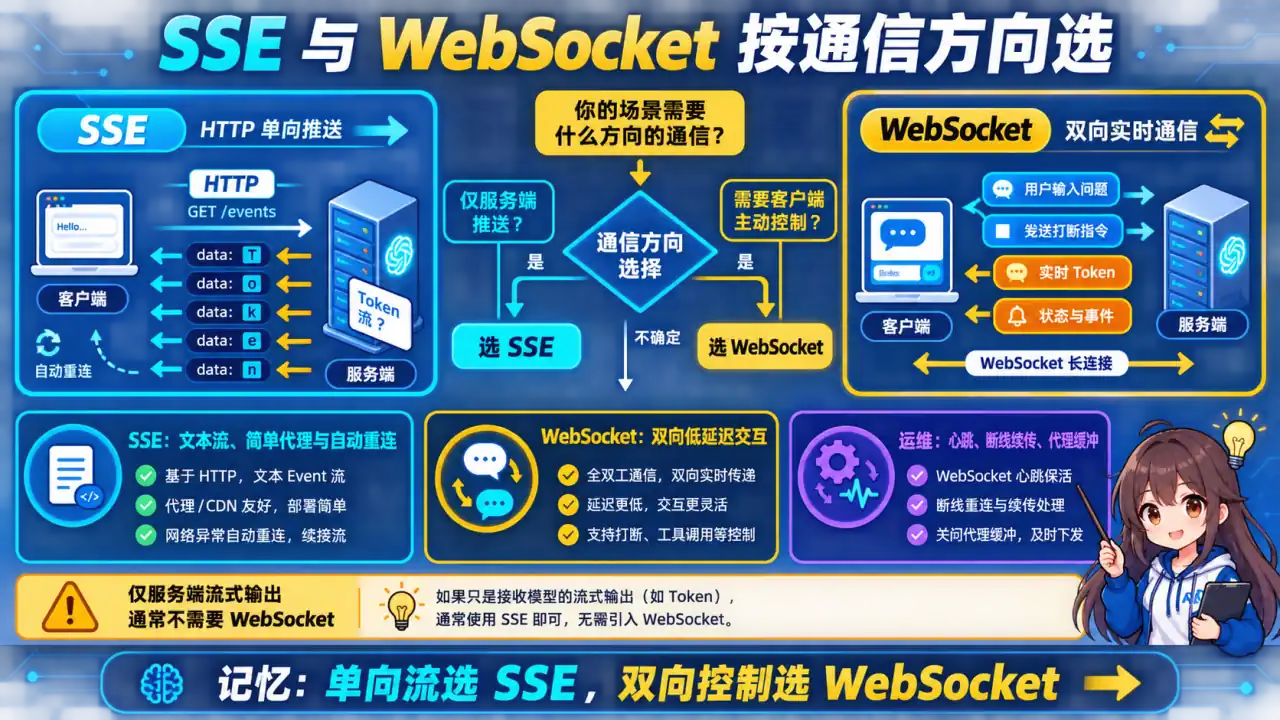
🧠 图解记忆:SSE vs WebSocket 核心区别;点击图片可查看原图。
💡 答案要点
SSE vs WebSocket 核心区别:
| 维度 | SSE(Server-Sent Events) | WebSocket |
|---|---|---|
| 方向 | 单向(Server → Client) | 双向 |
| 协议 | HTTP/1.1+ | 独立协议 ws:// |
| 断开重连 | 自动 | 手动处理 |
| 兼容性 | 需要 polyfill(旧浏览器) | 全面支持 |
| 复杂度 | 简单 | 复杂 |
| 适用 | AI 流式输出、实时日志 | 聊天、游戏、协作 |
"AI 应用 99% 用 SSE,因为 AI 输出是单向流(Server → Client),不需要双向通信。"
FastAPI 流式 SSE 实现:
展开 Python 代码示例(52 行)
python
from fastapi import FastAPI, Response
from fastapi.responses import StreamingResponse
import asyncio
import json

app = FastAPI()

@app.get("/v1/chat/stream")
async def chat_stream(message: str):
    """SSE 流式聊天接口"""

    async def event_generator():
        # 模拟 LLM 流式输出
        async def generate():
            prompt = f"请分析: {message}"
            # 实际项目用 OpenAI/Anthropic SDK:
            # stream = await client.chat.completions.create(
            #     model="gpt-4o",
            #     messages=[{"role": "user", "content": prompt}],
            #     stream=True
            # )

            # 模拟流式 token
            words = ["这是", "一个", "演示", "流式", "输出", "的", "例子"]
            for word in words:
                await asyncio.sleep(0.3)
                yield word

        accumulated = ""
        async for token in generate():
            accumulated += token

            # SSE 格式: data: {...}\n\n
            data = json.dumps({
                "token": token,
                "accumulated": accumulated,
                "done": False
            })
            yield f"data: {data}\n\n"

        # 结束信号
        yield f"data: {json.dumps({'done': True})}\n\n"

    return StreamingResponse(
        event_generator(),
        media_type="text/event-stream",
        headers={
            "Cache-Control": "no-cache",
            "Connection": "keep-alive",
            "X-Accel-Buffering": "no",  # 禁用 Nginx 缓冲
        }
    )
前端调用 SSE:
javascript
// 原生 EventSource(单向,只能 GET)
const eventSource = new EventSource(`/v1/chat/stream?message=${encodeURIComponent(msg)}`);

eventSource.onmessage = (event) => {
    const data = JSON.parse(event.data);
    if (data.done) {
        eventSource.close();
        console.log("生成完成:", data.accumulated);
    } else {
        // 流式更新 UI
        outputDiv.innerHTML += data.token;
    }
};

// 错误处理(EventSource 没有错误类型,需要手动心跳检测)
eventSource.onerror = () => {
    eventSource.close();
    console.log("SSE 连接断开");
};
SSE + POST 请求(用 Fetch API):
javascript
// SSE 本身只支持 GET,但可以用 Fetch + ReadableStream 实现 POST + 流式
async function streamChatPOST(message) {
    const response = await fetch("/v1/chat/stream", {
        method: "POST",
        headers: {"Content-Type": "application/json"},
        body: JSON.stringify({message})
    });

    const reader = response.body.getReader();
    const decoder = new TextDecoder();

    while (true) {
        const {done, value} = await reader.read();
        if (done) break;

        const chunk = decoder.decode(value);
        // 解析 SSE 数据
        const lines = chunk.split("\n");
        for (const line of lines) {
            if (line.startsWith("data: ")) {
                const data = JSON.parse(line.slice(6));
                console.log("收到:", data);
            }
        }
    }
}
WebSocket 实现(双向聊天):
python
from fastapi import WebSocket
from starlette.websockets import WebSocketState

@app.websocket("/ws/chat")
async def websocket_chat(websocket: WebSocket):
    await websocket.accept()

    try:
        while True:
            # 接收客户端消息(双向)
            data = await websocket.receive_text()

            # 发送响应(可以结合 SSE 流式)
            await websocket.send_text(f"Echo: {data}")

    except WebSocketState:
        await websocket.close()
面试话术:
"AI 流式输出 99% 用 SSE,不需要双向就用 SSE,简单、基于 HTTP、好调试。我的 FastAPI SSE 实现要点:StreamingResponse 返回,media_type 是 text/event-stream,记得加 X-Accel-Buffering: no 否则 Nginx 会缓冲导致延迟。前端用 EventSource 或 Fetch + ReadableStream 接收。唯一需要 WebSocket 的场景是'AI 回复的同时用户还要继续发消息'——这种双向通信才用 WebSocket,但实际产品中很少见。"