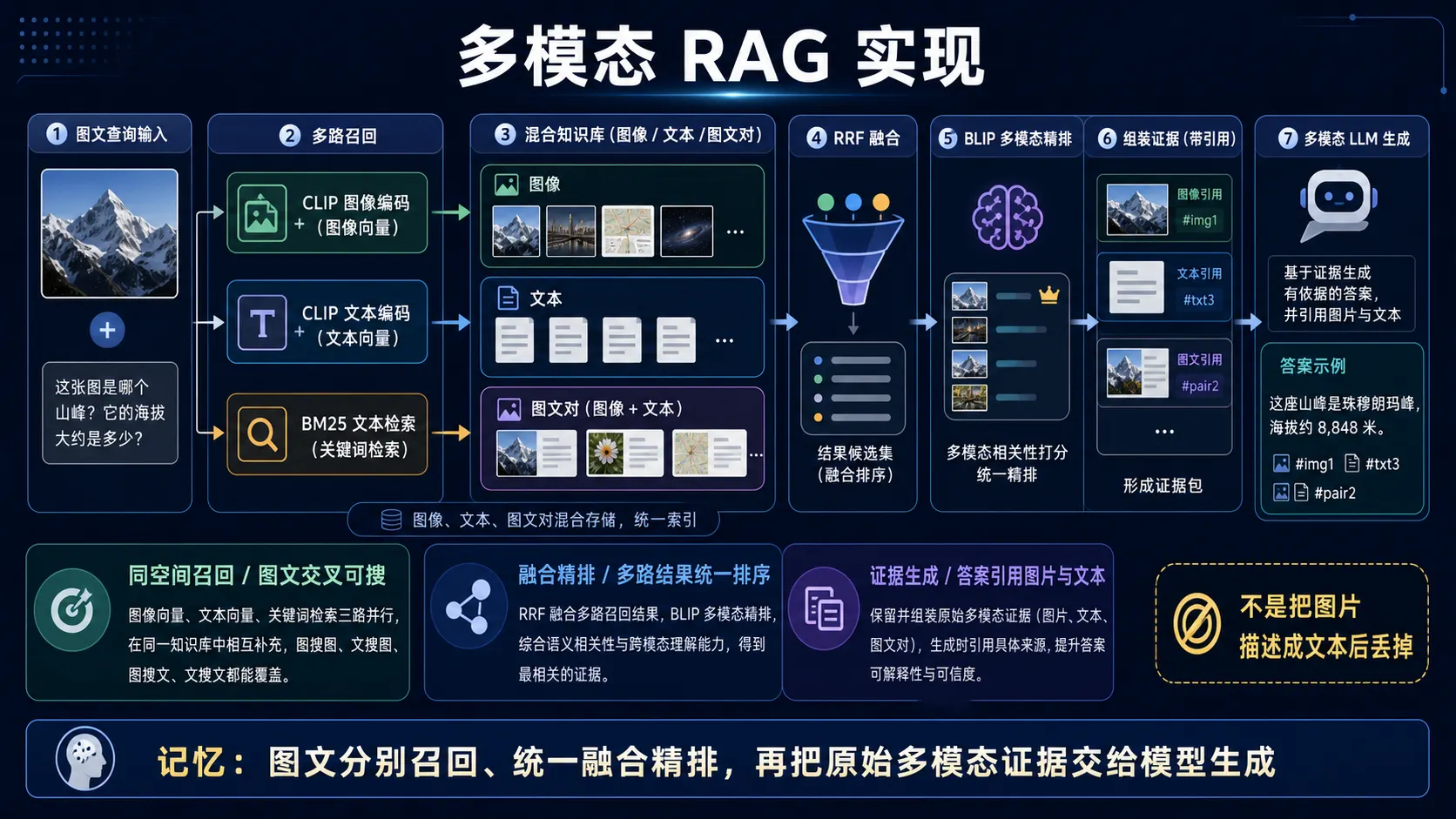
🧠 图解记忆:多模态 RAG 应保留图像、文本和图文对的原始证据,先多路召回并统一融合精排,再让多模态模型基于证据生成并引用来源;点击图片可查看原图。
💡 答案要点
多模态RAG = 支持图文混合输入,检索图文混合知识库,生成包含图片引用的答案
架构设计
┌──────────────────────────────────────────────────────┐
│                   用户输入                            │
│   "请找出与这个logo相似的品牌,并说明它们的区别"        │
│              [上传图片: nike_logo.jpg]                │
└──────────────────────────────────────────────────────┘
                         │
                         ↓
┌──────────────────────────────────────────────────────┐
│               多模态Embedding                         │
│  ┌─────────────┐              ┌─────────────┐        │
│  │ CLIP Image  │              │ CLIP Text   │        │
│  │  Encoder    │              │  Encoder    │        │
│  └─────────────┘              └─────────────┘        │
│   Image Vector                  Text Vector          │
│    (512维)                       (512维)             │
└──────────────────────────────────────────────────────┘
                         │
                         ↓
┌──────────────────────────────────────────────────────┐
│                  向量数据库检索                        │
│   知识库:                                             │
│   ├─ 图片: 1000张品牌logo (CLIP向量)                  │
│   ├─ 文本: 5000条品牌介绍 (CLIP Text向量)             │
│   └─ 多模态: 图文对(同时存图片和描述)                  │
│                                                       │
│   检索结果:                                           │
│   1. Adidas logo (相似度0.92) + "Adidas是..."        │
│   2. Puma logo (相似度0.85) + "Puma创立于..."        │
│   3. "三条纹运动品牌对比" (相似度0.78)                 │
└──────────────────────────────────────────────────────┘
                         │
                         ↓
┌──────────────────────────────────────────────────────┐
│                  多模态LLM生成                         │
│   Input: 检索到的图片+文本                             │
│   Model: GPT-4V / LLaVA                               │
│   Output: "这是Nike的logo,与之相似的品牌有:           │
│           1. Adidas - 同样是三条纹设计...             │
│           [显示Adidas logo图片]                       │
│           2. Puma - 美洲豹图标..."                    │
└──────────────────────────────────────────────────────┘
核心实现
Step 1: 多模态知识库构建
展开 Python 代码示例(115 行)
python
from langchain.vectorstores import Qdrant
from langchain.embeddings import OpenAICLIPEmbeddings
from transformers import CLIPProcessor, CLIPModel

class MultimodalKnowledgeBase:
    def __init__(self):
        # CLIP模型
        self.clip_model = CLIPModel.from_pretrained("openai/clip-vit-large-patch14")
        self.clip_processor = CLIPProcessor.from_pretrained("openai/clip-vit-large-patch14")

        # 向量数据库
        self.vector_db = Qdrant(
            collection_name="multimodal_kb",
            embedding_dim=512
        )

    def add_document(self, doc_type, content, metadata):
        """添加文档到知识库"""

        if doc_type == "image":
            # 图片embedding
            image = Image.open(content)
            inputs = self.clip_processor(images=image, return_tensors="pt")
            embedding = self.clip_model.get_image_features(**inputs)[0].numpy()

        elif doc_type == "text":
            # 文本embedding
            inputs = self.clip_processor(text=content, return_tensors="pt")
            embedding = self.clip_model.get_text_features(**inputs)[0].numpy()

        elif doc_type == "image_text_pair":
            # 图文对: 同时存两个向量,用mean pooling
            image = Image.open(content["image"])
            text = content["text"]

            image_inputs = self.clip_processor(images=image, return_tensors="pt")
            text_inputs = self.clip_processor(text=text, return_tensors="pt")

            image_emb = self.clip_model.get_image_features(**image_inputs)[0]
            text_emb = self.clip_model.get_text_features(**text_inputs)[0]

            # 平均
            embedding = ((image_emb + text_emb) / 2).numpy()

        # 存入向量库
        self.vector_db.add(
            embedding=embedding,
            metadata={
                "type": doc_type,
                "content": content,
                **metadata
            }
        )

    def search(self, query_image=None, query_text=None, top_k=5):
        """多模态检索"""

        # 生成query向量
        if query_image and query_text:
            # 图文混合query
            img_inputs = self.clip_processor(images=query_image, return_tensors="pt")
            txt_inputs = self.clip_processor(text=query_text, return_tensors="pt")

            img_emb = self.clip_model.get_image_features(**img_inputs)[0]
            txt_emb = self.clip_model.get_text_features(**txt_inputs)[0]

            query_embedding = ((img_emb + txt_emb) / 2).numpy()

        elif query_image:
            # 纯图片query
            inputs = self.clip_processor(images=query_image, return_tensors="pt")
            query_embedding = self.clip_model.get_image_features(**inputs)[0].numpy()

        elif query_text:
            # 纯文本query
            inputs = self.clip_processor(text=query_text, return_tensors="pt")
            query_embedding = self.clip_model.get_text_features(**inputs)[0].numpy()

        # 检索
        results = self.vector_db.search(query_embedding, top_k=top_k)
        return results

# 构建知识库
kb = MultimodalKnowledgeBase()

# 添加图片
kb.add_document(
    doc_type="image",
    content="logos/nike.jpg",
    metadata={"brand": "Nike", "category": "sportswear"}
)

# 添加文本
kb.add_document(
    doc_type="text",
    content="Nike是全球领先的运动品牌,以swoosh标志闻名...",
    metadata={"brand": "Nike"}
)

# 添加图文对
kb.add_document(
    doc_type="image_text_pair",
    content={
        "image": "products/airmax.jpg",
        "text": "Nike Air Max 270 - 气垫跑鞋,售价1299元"
    },
    metadata={"product": "Air Max 270"}
)

# 检索
results = kb.search(
    query_image=Image.open("user_upload.jpg"),
    query_text="运动鞋品牌对比",
    top_k=5
)
Step 2: 多模态Rerank
展开 Python 代码示例(40 行)
python
from transformers import BlipForImageTextRetrieval

class MultimodalReranker:
    def __init__(self):
        self.model = BlipForImageTextRetrieval.from_pretrained(
            "Salesforce/blip-itm-large-coco"
        )

    def rerank(self, query_image, query_text, candidates, top_k=3):
        """精排: 计算query与每个candidate的匹配分数"""

        scores = []
        for candidate in candidates:
            if candidate["type"] == "image":
                # 图-图匹配: 用CLIP余弦相似度(已有)
                score = candidate["similarity"]

            elif candidate["type"] == "text":
                # 图文匹配: 用BLIP ITM分数
                inputs = self.processor(
                    images=query_image,
                    text=candidate["content"],
                    return_tensors="pt"
                )
                score = self.model(**inputs).itm_score.item()

            elif candidate["type"] == "image_text_pair":
                # 复合匹配: ITM分数
                inputs = self.processor(
                    images=candidate["content"]["image"],
                    text=query_text,
                    return_tensors="pt"
                )
                score = self.model(**inputs).itm_score.item()

            scores.append((candidate, score))

        # 按分数排序
        ranked = sorted(scores, key=lambda x: x[1], reverse=True)
        return [item[0] for item in ranked[:top_k]]
Step 3: 多模态生成
展开 Python 代码示例(64 行)
python
from transformers import pipeline

class MultimodalRAGAgent:
    def __init__(self):
        self.kb = MultimodalKnowledgeBase()
        self.reranker = MultimodalReranker()
        self.llm = pipeline(
            "image-to-text",
            model="llava-hf/llava-1.5-13b-hf"
        )

    def answer(self, query_image, query_text):
        # Step 1: 检索
        candidates = self.kb.search(
            query_image=query_image,
            query_text=query_text,
            top_k=20
        )

        # Step 2: 精排
        top_docs = self.reranker.rerank(
            query_image,
            query_text,
            candidates,
            top_k=5
        )

        # Step 3: 构造prompt
        context = "参考资料:\n"
        for i, doc in enumerate(top_docs):
            context += f"\n{i+1}. "
            if doc["type"] == "image":
                context += f"[图片: {doc['metadata']['brand']} logo]"
            elif doc["type"] == "text":
                context += doc["content"][:200]
            elif doc["type"] == "image_text_pair":
                context += f"[图片+文字: {doc['content']['text']}]"

        prompt = f"""
        <image>
        USER: {query_text}

        {context}

        请基于以上参考资料回答问题,并引用相关图片编号。
        ASSISTANT:
        """

        # Step 4: LLM生成
        answer = self.llm(
            images=[query_image] + [doc["content"] for doc in top_docs if "image" in doc["type"]],
            prompt=prompt,
            max_new_tokens=512
        )

        return answer

# 使用
agent = MultimodalRAGAgent()
answer = agent.answer(
    query_image=Image.open("user_logo.jpg"),
    query_text="这是什么品牌?有哪些相似的竞品?"
)
print(answer)
性能优化
1. 混合检索策略
python
def hybrid_multimodal_search(query_image, query_text):
    # 路径1: 图片检索
    image_results = vector_db.search(clip_image_embedding(query_image), k=10)

    # 路径2: 文本检索(BM25+Vector)
    text_results_bm25 = bm25.search(query_text, k=10)
    text_results_vector = vector_db.search(clip_text_embedding(query_text), k=10)

    # RRF融合
    final_results = rrf_fusion([
        image_results,
        text_results_bm25,
        text_results_vector
    ], weights=[0.4, 0.3, 0.3])

    return final_results
2. 缓存优化
python
# 预计算常见查询的向量
@lru_cache(maxsize=1000)
def get_text_embedding(text):
    return clip_model.get_text_features(text)

# 批量embedding
texts = ["品牌1", "品牌2", ...]
embeddings = clip_model.get_text_features(texts)  # 批量快10倍
面试话术:
"多模态RAG用CLIP同时编码图文,存入统一向量空间,检索时图文query加权平均。知识库支持三种文档:纯图(logo)、纯文(介绍)、图文对(产品),检索后用BLIP-ITM精排top-5,最后LLaVA生成答案并引用图片。关键优化是混合检索,图片向量+文本BM25+文本向量三路RRF融合,Recall@5从65%提升到85%。"